Know what needs attention
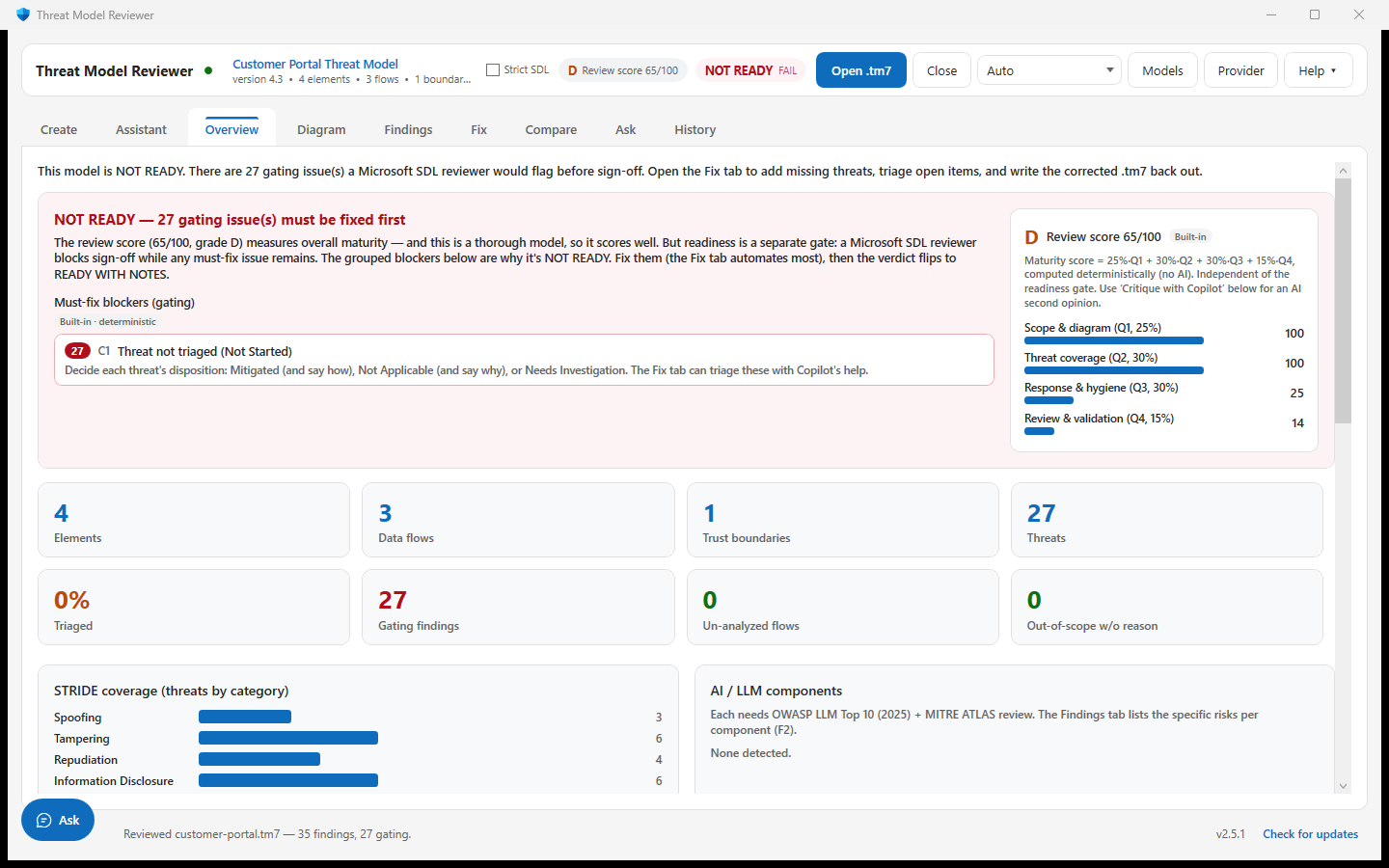
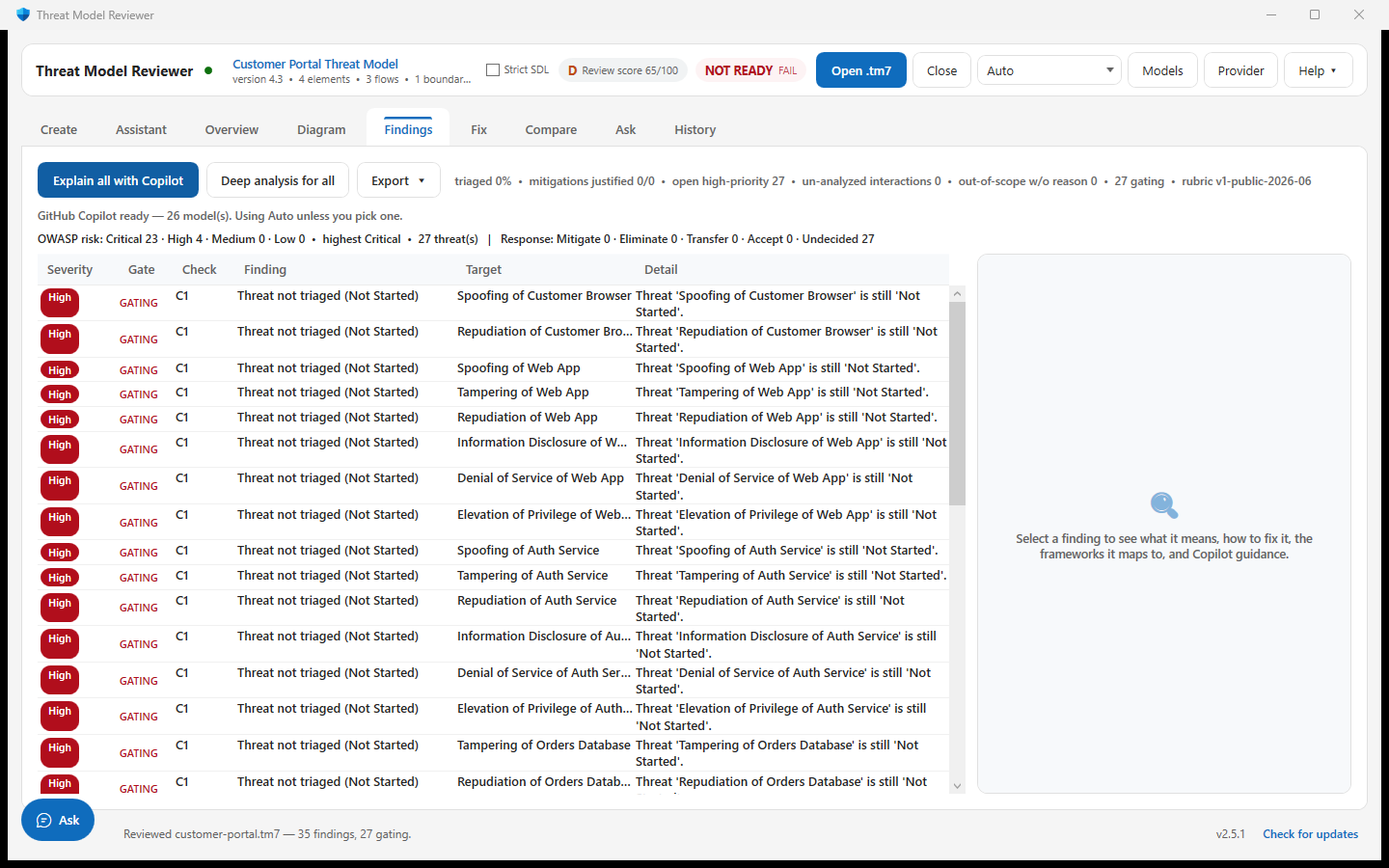
Open a .tm7 or Threat Dragon .json. Get a score, readiness verdict and findings with check IDs and references, rather than an unexplained AI judgement.
Find missing coverage, unfinished triage and structural issues. Work through the findings, save a corrected model, and give your reviewer a clearer starting point.
MSI recommended. No Copilot subscription needed for deterministic review.
This tool improves the threat model. It does not patch application code, prove a system secure or guarantee Microsoft approval.
Use it before a review, while drafting a model, or when checking what changed.
Open a .tm7 or Threat Dragon .json. Get a score, readiness verdict and findings with check IDs and references, rather than an unexplained AI judgement.
Preview missing threats, triage changes and draft justifications. Choose what to apply and save a new .tm7. A proposed mitigation still needs an owner and verification.
Export reports or tracker-ready work items for GitHub, Azure DevOps and Jira. Compare revisions and keep local review history. Optional AI can help explain findings and propose mitigation tests.
Draft from a description, supported architecture files or an Azure resource group. Review the inferred components and paths before generating threats. Use a suitable TMT baseline when you need to reopen newly authored files in Microsoft TMT.
Azure is an additional starting point, not a complete traffic map. Read-only metadata queries and eligible role assignments suggest possible access paths. Shared-key access and out-of-scope dependencies can be missing; review the evidence and the draft.
The synthetic customer portal has intentionally unfinished triage. Open it in the app, inspect the C1 findings, then preview a fix plan. No Copilot sign-in is needed.
Extract the Windows CLI bundle and run:
.\ThreatModelReviewer.Cli.exe .\customer-portal.tm7Expected: NOT READY, 65/100, with 27 gating findings. Exit code 2 means the review found blockers; 1 means the command could not run.
Moving a threat to Needs Investigation is not a security fix. Keep investigating and record implementation evidence.
A real review of the synthetic customer portal. The sample result is reproducible under the default rubric. Screenshots use a development build; small UI details may differ from the released installer.
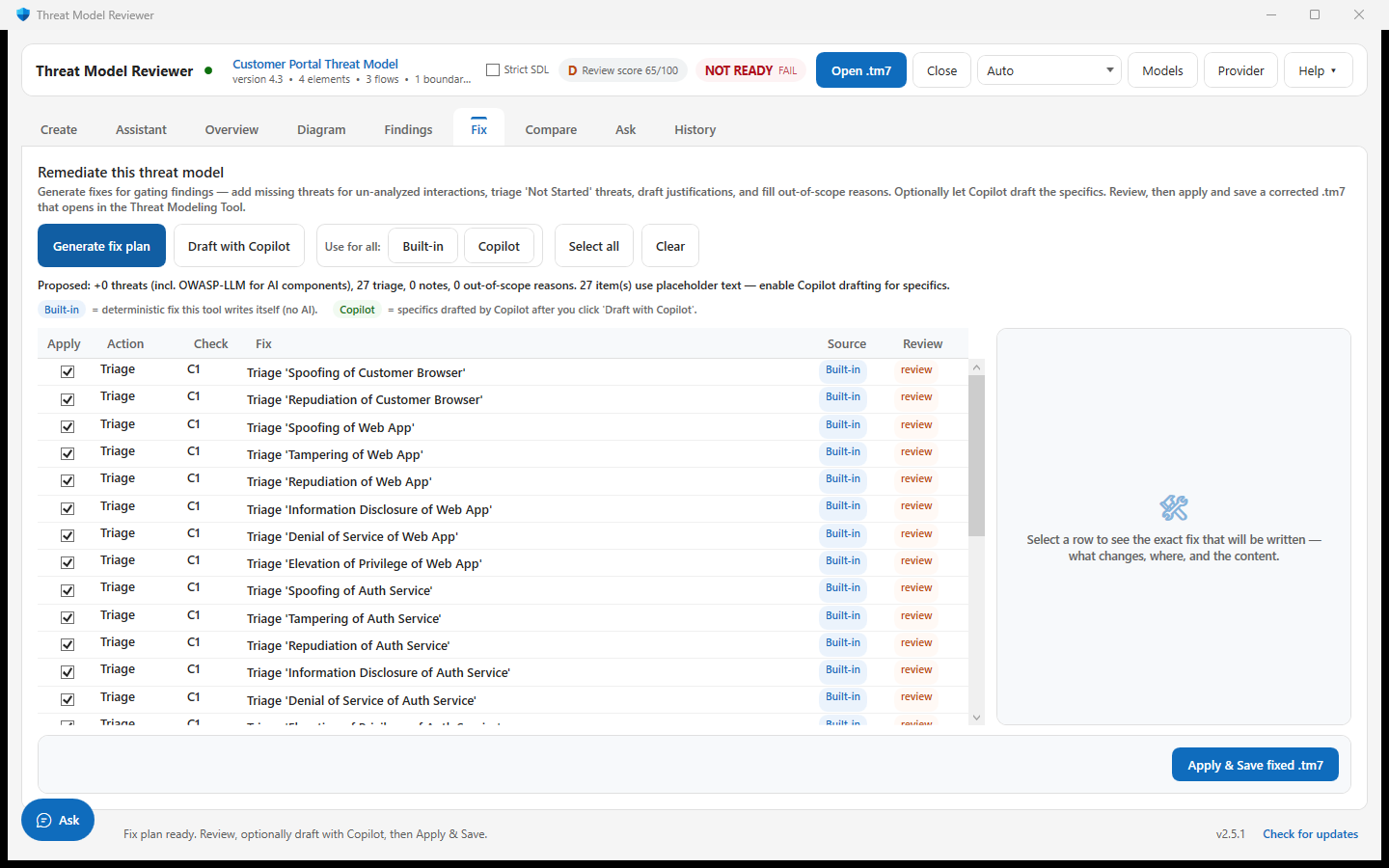
.tm7 that reopens in the Threat Modeling Tool.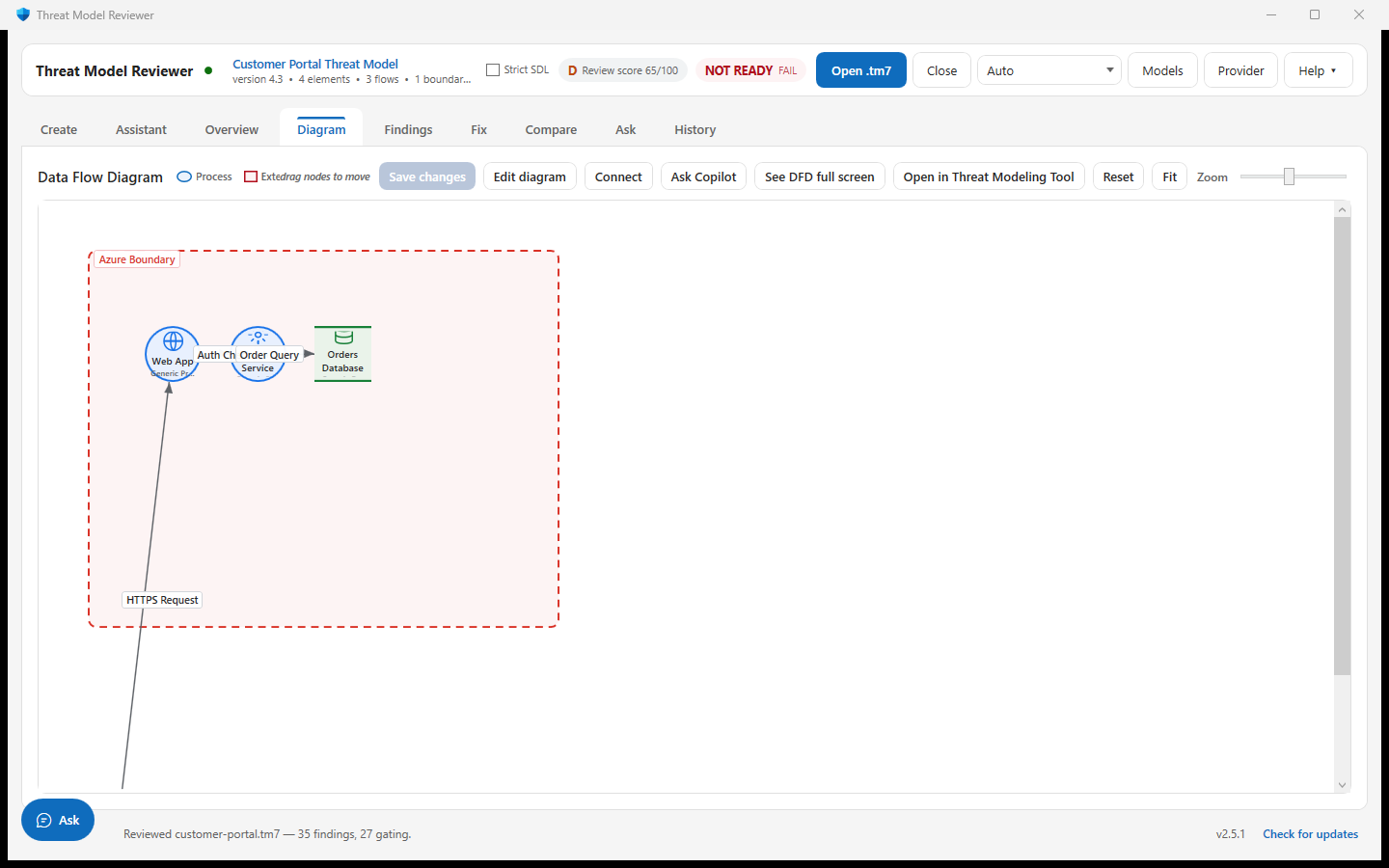
The verdict is computed before any optional AI explanation.
The .tm7 is read into elements, flows, trust boundaries and threats. OWASP Threat Dragon .json works too, so a mixed toolchain lands in one place.
72 rules run over that structure. Each is ordinary code with a fixed identifier — C1, A6, L3 — so a finding can be traced to the exact rule that raised it and argued with on its merits.
Maturity is a weighted 0–100 score. Readiness is a separate gate: a high-scoring model can still have a must-fix finding. These are signals about the model, not proof that controls are deployed.
Only now can Copilot help — describing a finding, drafting a mitigation, critiquing the model. It cannot change the score or the verdict, because those were already computed.
The same model, rubric version and policy produce the same result. READY WITH NOTES means no gating findings remain under that configuration.
Your reviewer still decides what evidence and risk treatment are sufficient.
72 deterministic checks apply public security guidance to the model you provide. Each finding can be traced to its rule.
The same deterministic review engine, with a surface suited to your task.
Inspect diagrams, review findings and preview model edits. Create and Assistant support drafting; Ask and floating Ask share local and optional AI modes.
Desktop guideRun reviews in CI, export SARIF, compare revisions or apply an organization policy with disclosure. The headless bundle is separate from the desktop installer.
CLI guideAsk an agent to invoke the reviewer and report its actual results. Install the skill and the CLI bundle together; the instructions do not replace the engine.
Skill guideDesktop and CLI bundles include .NET. The Copilot CLI skill is a separate download and requires the matching CLI. Current release: See releases.
Standard installer — choose all-users or just-me at install time. Supports in-app updates; deployment policy still applies.
Download .msiPer-user installer with a Start-Menu shortcut and uninstall — no admin needed.
Download setup.exeThe same deterministic engine with no UI. Self-contained — extract and run. Exit code 2 means NOT READY, so a build can gate on it.
Ask an agent to review, explain, fix or compare a model in plain English. The verdict still comes from the deterministic engine — the agent only runs it. Needs the command-line bundle alongside it.
Download skillPackaged install — certificate trust requires approval under your device policy. AI may be limited under MSIX.
Download .msixRelease integrity: SHA-256 checksums and source/runtime provenance are supporting files, not installers. Older releases may not include them.
On v1.0.4 or later the app updates itself — click Download & install on the in-app banner, then Install & restart. Every version, its notes and all files are on the releases page.
Optional developer context uses eight restricted operations across Microsoft Learn, Azure metadata and GitHub. Sources default to off, require consent, and do not affect the deterministic verdict. Read the MCP setup guide and Microsoft TMT compatibility limits.
The parts that decide readiness are fully deterministic and run locally. Copilot only assists.
The NOT READY / READY-WITH-NOTES verdict, the 0–100 score and the findings come from a fixed rubric engine — never from AI. Copilot only explains findings and drafts fixes you choose to apply, so the same model always scores the same way.
Deterministic review runs locally. Optional AI actions send context to your chosen provider; image extraction sends the selected image. Read the privacy guide before using confidential inputs.
The app does not collect product analytics. Update checks can be disabled. AI, Azure discovery and enabled MCP sources are separate network features; external runtimes have their own settings.
Everything a security review and a deployment team need, documented up front.
Every network destination, on-disk storage path and redaction rule is enumerated — plus how to verify the claims yourself with a proxy or offline run.
MSI with per-machine or per-user scope, documented UpgradeCode and silent switches for Intune, SCCM and Group Policy.
Disable update checks and leave remote AI, Azure discovery and MCP sources unused. Deterministic review and built-in model fixes need no network.
Use GitHub Copilot, or point the provider at Azure OpenAI or a self-hosted OpenAI-compatible endpoint. Credentials are DPAPI-encrypted locally.
CLI review runs the deterministic engine headlessly and exits 2 for NOT READY. --sarif writes a local file; upload to code scanning is a separate workflow.
Executables and installers use the project's current self-signed certificate. ZIP containers are not Authenticode-signed. Follow the install guide and your organization's software policy.
Everything you need to install, use and troubleshoot the app. Browse all guides without leaving this site.